Aligner treatment simulation software
Turn aligner treatment plans into clear, interactive 3D simulations.
Upload your treatment plan, review it with the doctor, and share a private browser link with the patient, all under your lab's brand.
5 free casesNo card requiredWorks with top planning software
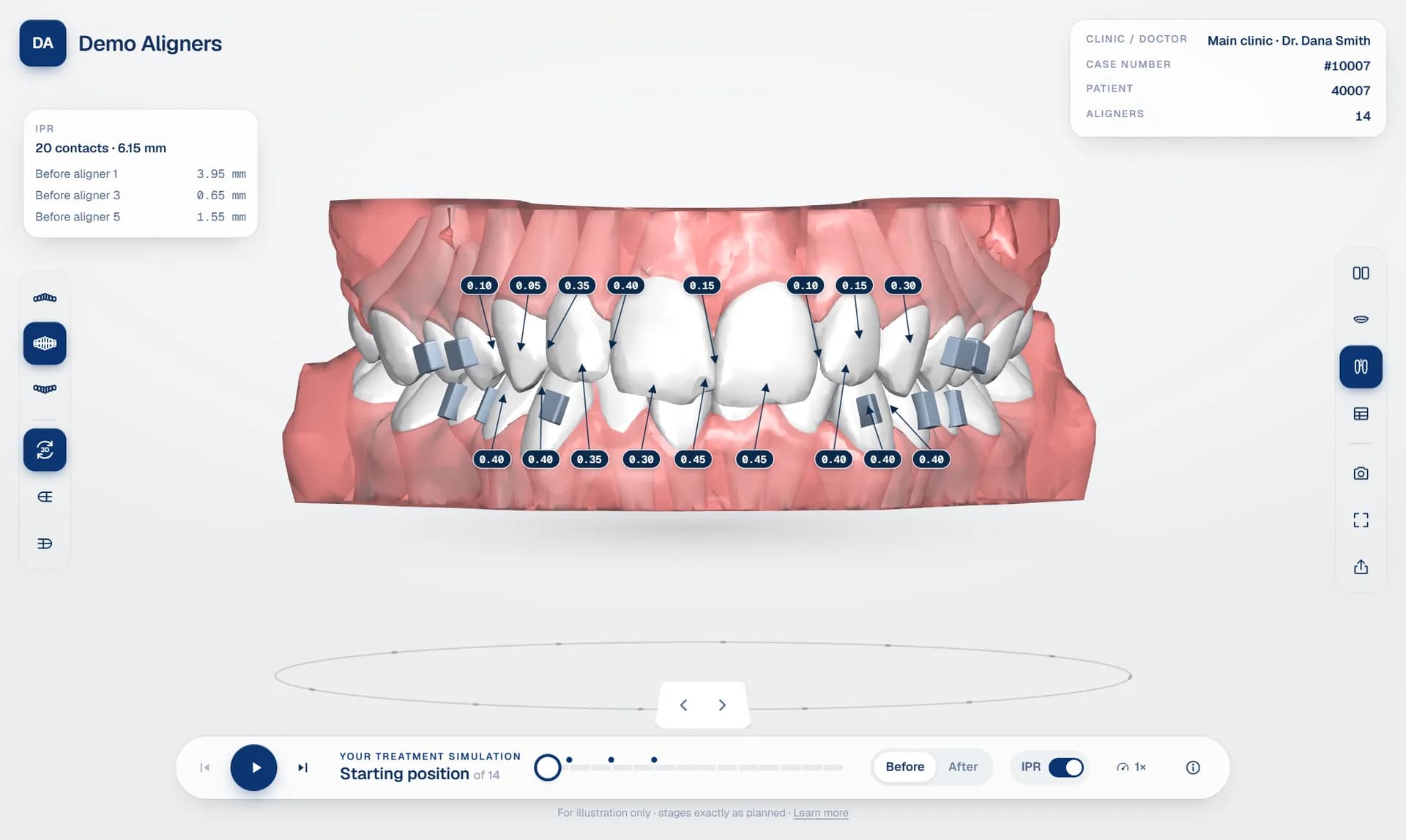
Real case in the patient viewer · IPR on · 14 aligners · WebGL in the browser, nothing to install
Workflow
From planning export to an approved patient simulation in minutes
One workflow for aligner labs: treatment plan sharing, doctor approval and patient links, in one place.
- 01
Upload
Upload the plan exported from your planning software: the top planning software is supported, or staged STL / OBJ / PLY / 3MF files, as a zip or a folder.
Top planning software · STL · OBJ · PLY · 3MF
- 02
Process
Files are virus-scanned, stages detected, and teeth, gums and attachments separated into a compact 3D package that opens in any browser.
Automatic processing
- 03
Review
Send the plan to the treating doctor. They play every stage, check IPR and movements, request changes on a specific tooth and stage, or approve.
Doctor approval
- 04
Share
Give the patient a private link by WhatsApp, link or QR code, with an optional PIN and expiry. It opens on their phone, with nothing to install.
PIN-protected links
3D aligner treatment viewer
Built for orthodontic accuracy
A browser-based dental 3D viewer that shows every stage exactly as planned, with IPR, attachments and the tooth movement table from the planning software.
Anatomical views
Upper, lower or both arches. Front, left, right and occlusal views, open mouth, and side-by-side or overlaid start and result.
UpperLowerBothOcclusalIPR and attachments
IPR values in millimetres at each contact, plus the full IPR protocol aligner by aligner. Attachments are shown on the teeth.
IPRAttachmentsStaged treatment animation
Teeth glide smoothly from aligner to aligner, and the gums move with them. Play, step through, or jump to any aligner.
Smooth playbackBefore / afterWorks on any device
Phones, tablets and computers in the browser. No plugins, no downloads.
Orthodontic tooth movement table
From the planning software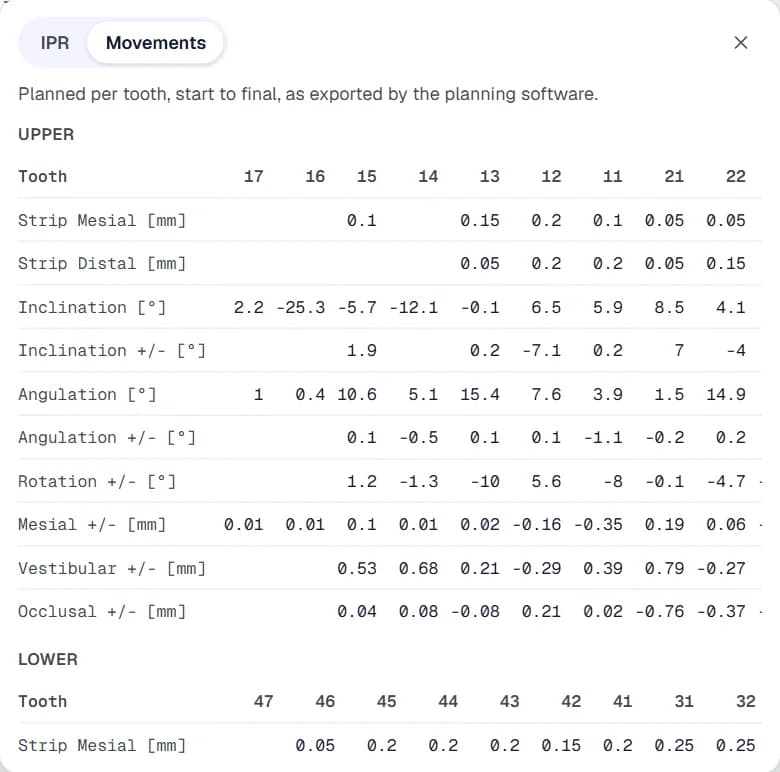
Planned movement per tooth, start to final, as exported by the planning software · FDI notation
Aligner lab software
Organised the way your lab really works
Aligner case management that follows your structure: Clinic → Doctor → Patient → Case → Revisions.
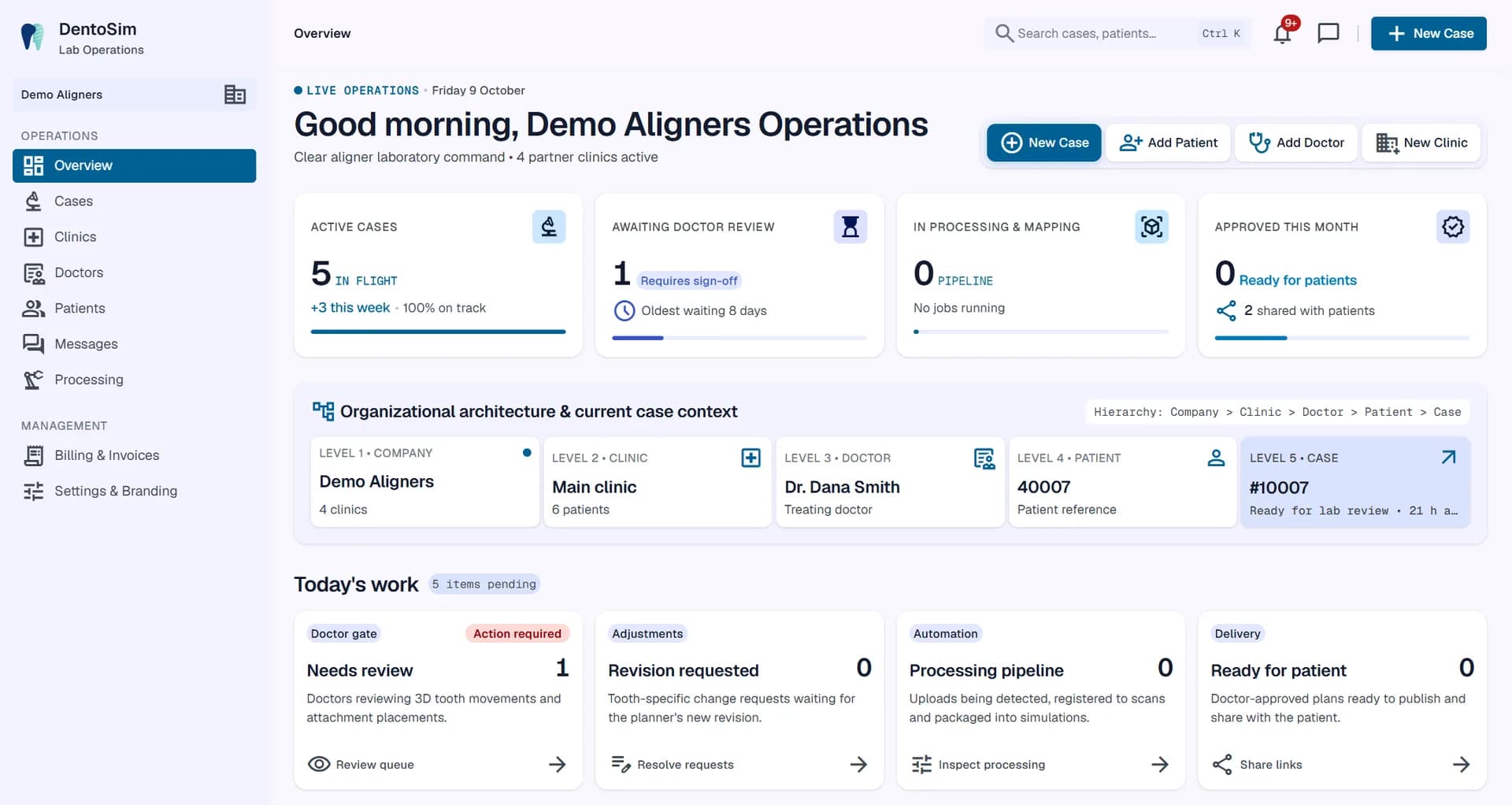
Today's work at a glance
Cases awaiting doctor review, change requests, processing and plans ready for patients.
Every revision kept
Upload a new revision whenever the plan changes. The doctor always reviews the current one, and the history stays.
Nothing slips
Notifications when a doctor approves, requests changes or messages you, and when a patient opens the simulation.
Doctor approval platform
No more email chains and unclear phone calls
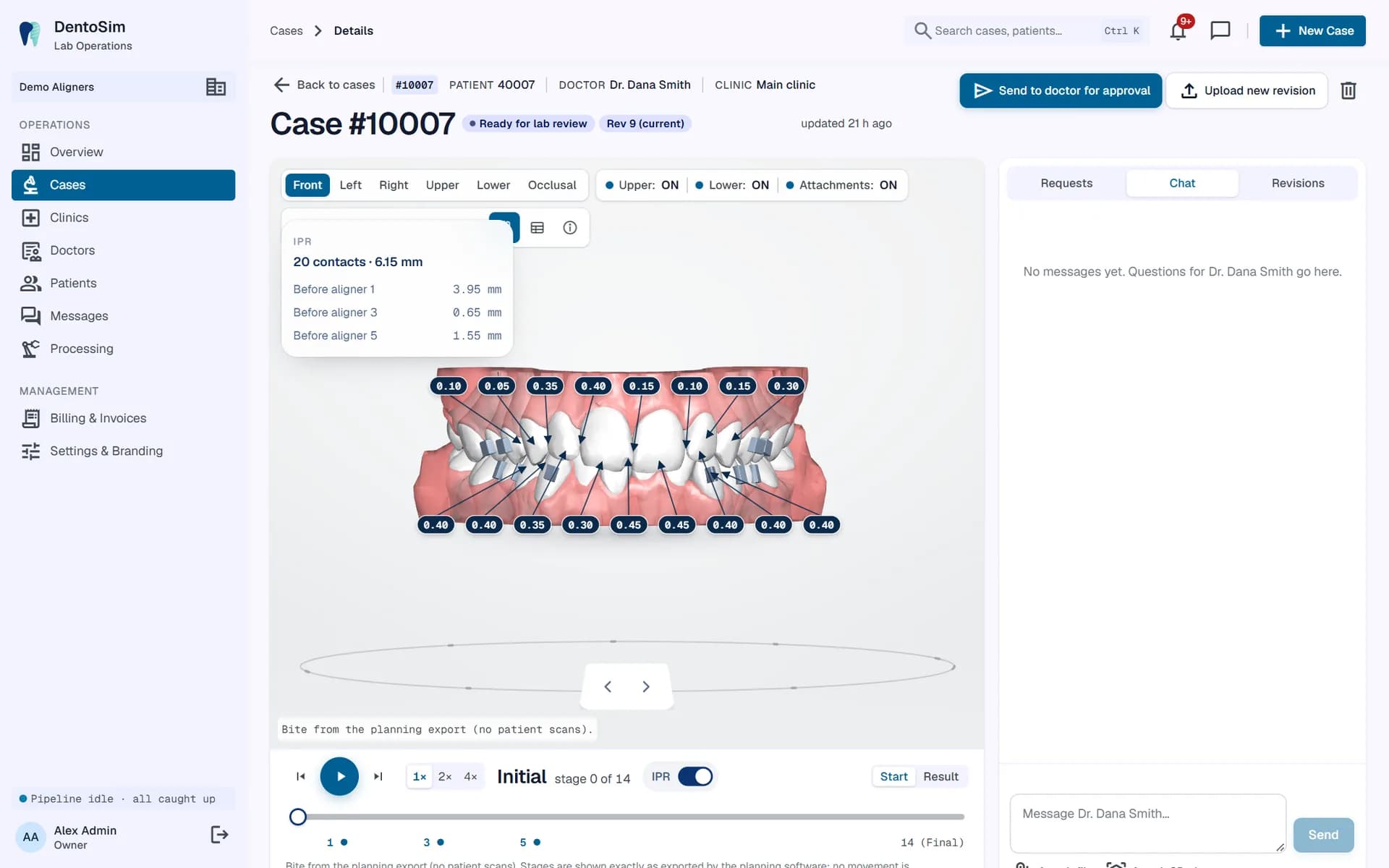
Doctors review the plan in 3D and ask for exactly what they want changed, on a specific tooth at a specific aligner.
Tooth-level change requests. Doctors propose an adjustment to one tooth at one stage (rotation, tip, torque or translation), and the lab sees it next to the planned value.
Chat on every case. Messages that mention a stage and tooth open the 3D viewer right there. Files and 3D views can be attached.
Clear sign-off. The doctor approves or requests changes, and every decision is logged with who made it and when.
Patient experience
A patient experience that builds treatment confidence
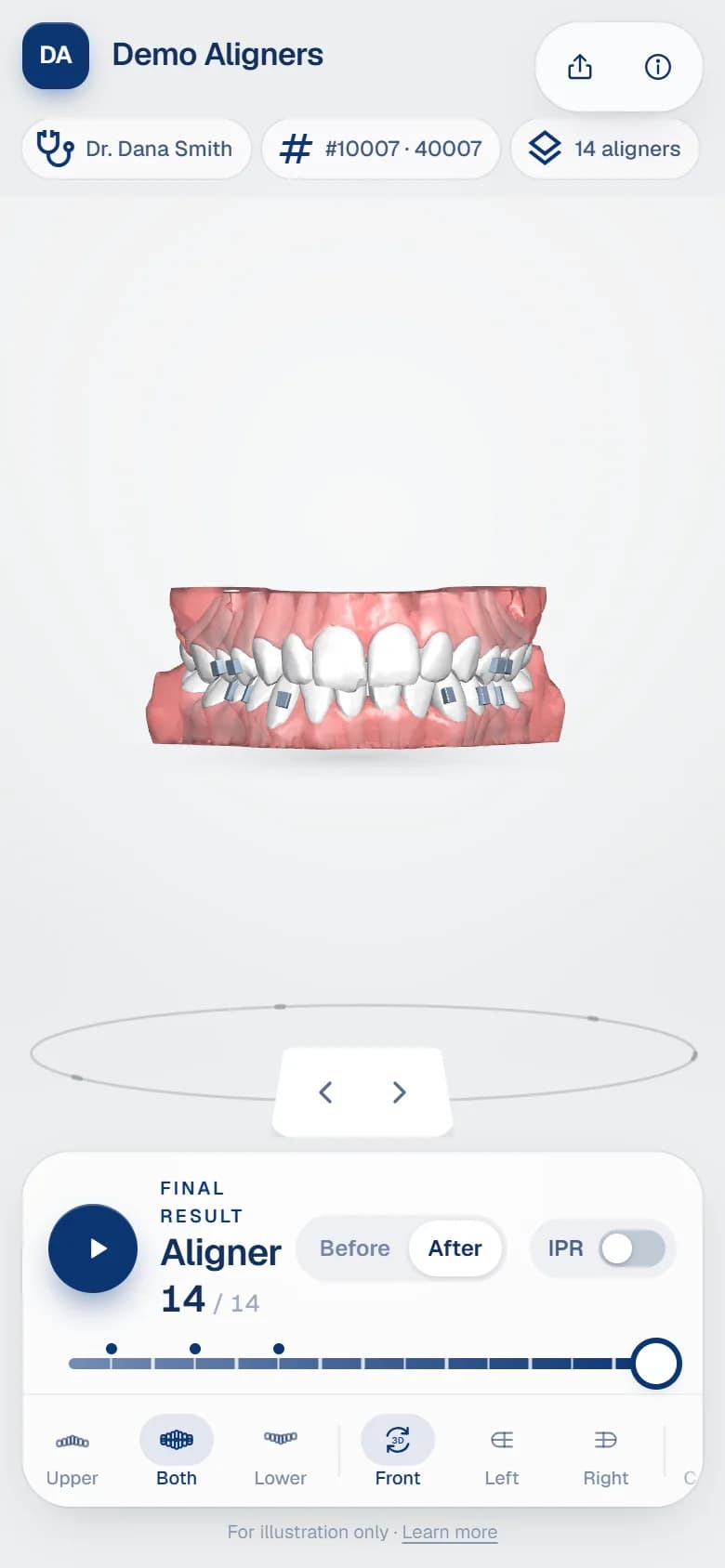
Patients get an interactive orthodontic simulation of their own smile, from the first aligner to the final result. They open it from WhatsApp, a link or a QR code.
Optional PIN
Protect each link with a 4 to 8 digit PIN that the practice gives the patient.
Expiry and revoke
Set an expiry date or revoke a link at any time. Every view is logged.
Nothing to install
Works in Safari and Chrome on phones and tablets, and on desktop.
Before and after
Start and result side by side, plus play-through, bite views and open mouth.
White label aligner viewer
Your lab. Your brand. Your simulation experience.
Private label orthodontic software: DentoSim stays in the background, and doctors and patients see your logo, colours and domain.
Standard
Included yourlab.dentosim.cloud
- Clean, clinical DentoSim look
- Your lab's own subdomain
- Patient links by WhatsApp, link or QR code
Private label
Branded- Your custom domain, e.g. simulation.yourlab.com
- Your logo and brand colours on every screen
- Your company address, phone and website in the viewer
- Branded treatment plan viewer for doctors and patients
Security
Careful with patient data
Each lab's data is kept separate, and access depends on each person's role.
Roles
Owner, admin, operations, planner, viewer and doctor roles. Doctors see only their own cases.
Two-factor sign-in
Optional authenticator-app (TOTP) codes for every account.
Virus-scanned uploads
Every uploaded file is scanned before it is processed.
Audit log
Uploads, approvals, link creation, link views and sign-ins are recorded.
Pricing
Pay per case. No licence fees.
No upfront software licence. Start free, then pay only for the cases you process.
Free start
$0
first 5 cases
Try the full platform on real cases.
- Every feature included
- Unlimited doctors and patient links
- Your lab's own subdomain
- No card required
Per case
Per case
rate based on your volume
After the free cases, pay for each case processed that month.
- Revisions of a case are free
- Doctors and patients are free
- Invoices and payment history in Billing
- Cancel any time
Private label
Custom
for brands and networks
For aligner brands that want their own look and domain.
- Custom domain
- Your logo, colours and contact details
- Help importing your planning software's exports
- Volume pricing
Questions from aligner labs
Frequently asked questions
What does DentoSim do?
DentoSim is aligner treatment simulation software for aligner labs. You upload the treatment plan exported from your planning software and DentoSim turns it into an interactive 3D simulation that runs in the browser. Doctors review and approve it in their portal, and patients open it from a private link.
Which planning software and file formats are supported?
Exports from the top treatment planning software are recognised automatically, including their IPR (stripping) and tooth movement tables. Staged STL, OBJ, PLY, 3MF or GLB files work too, as a zip or a folder. An unfamiliar export is mapped once and saved as a template, so the next one is automatic.
Do doctors or patients need to install anything?
No. The 3D aligner treatment viewer runs in any modern browser on a phone, tablet or computer. Doctors can also use the DentoSim app, which sends a push alert when a plan is ready for review.
Can patient links be protected with a PIN?
Yes. Every patient link can have a 4 to 8 digit PIN and an expiry date, and you can revoke it at any time. Share it by WhatsApp, as a link or as a QR code.
Can we white-label the viewer with our logo and domain?
Yes. With private label, the lab's logo, colours and company details appear on every screen. The lab gets its own subdomain, or can use its own domain, so doctors and patients see your brand rather than ours.
How is it priced?
You start with free cases. After that you pay per processed case each month, at a rate based on your volume. Revisions of a case, doctors and patient links cost nothing extra.
Make your next treatment plan easier to review and understand.
Give your doctors confidence with interactive 3D simulations under your own brand.
5 free casesNo card requiredWorks with top planning software