
aligner IPR visualisation
Aligner IPR Visualisation: Showing Interproximal Reduction Clearly
How aligner IPR visualisation shows interproximal reduction in 3D: values per contact, timing per aligner, and an IPR protocol doctors can follow.
· 2 min read · DentoSim
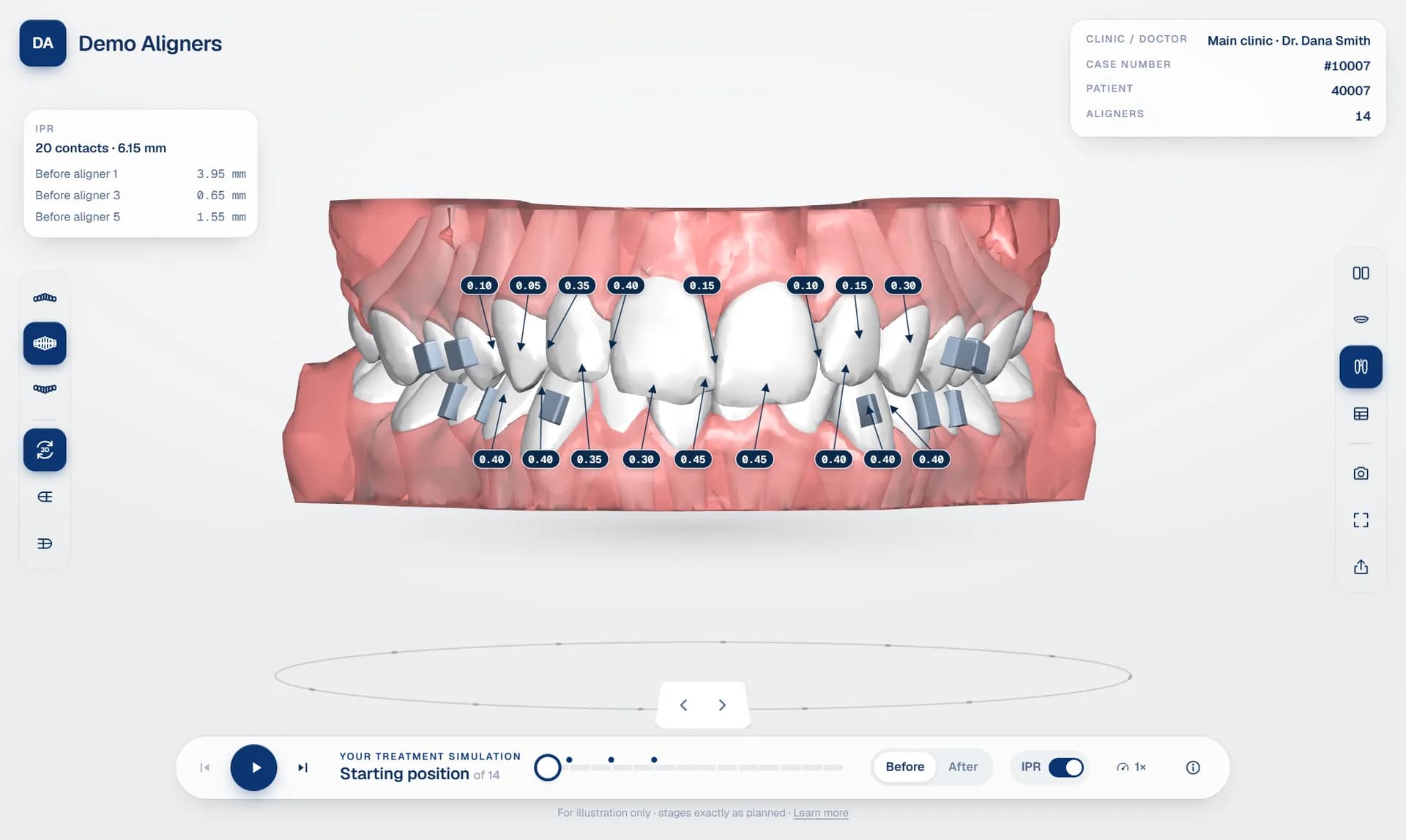
Interproximal reduction (IPR), also called stripping, removes a small amount of enamel between teeth to create space. In many aligner plans it is essential, and getting it right matters: the right amount, between the right teeth, before the right aligner. Aligner IPR visualisation makes that information impossible to miss.
Why IPR needs to be visual
IPR is often delivered as a table or a PDF: tooth pairs, millimetres and stage numbers. It is accurate, but easy to misread at the chair. When the same information appears on the 3D model, with a value pointing at each contact, the doctor sees immediately where the reduction is and how it relates to the movement.
What good IPR visualisation shows
- A value at each contact, in millimetres, with a clear pointer to the exact contact point.
- The timing: which aligner each reduction should be done before.
- A summary of the protocol: the number of contacts, the total amount, and the amount at each step.
- Upper and lower separately, so the values do not overlap.
- An on/off switch, so the labels can be hidden when the doctor or patient just wants to watch the movement.
IPR protocol, aligner by aligner
A clear IPR protocol groups reductions by step: for example, before aligner 1, before aligner 3 and before aligner 5, with the contacts and amounts for each. The doctor can jump straight to the aligner where IPR is due and see the contacts on the model at that moment.
DentoSim reads IPR directly from the planning software's export where it is available, so the values in the viewer are the values in the plan. Nothing is retyped.
Should patients see IPR?
Some labs and doctors prefer to explain IPR to the patient in person. Others like the patient to see it. With an on/off switch, the doctor decides how to use it during the consultation.
IPR alongside the movement table
IPR is one row of a bigger picture. The orthodontic tooth movement table shows mesial and distal stripping per tooth next to rotation, angulation and translation, so the doctor can see why the space is needed. Try both in the 3D aligner treatment viewer.
Frequently asked questions
What is IPR in aligner treatment?
Interproximal reduction: removing a small amount of enamel between teeth to create space for planned movements. It is planned per contact and per aligner.
Where do the IPR values come from?
From the treatment plan. DentoSim reads IPR from the planning software's export where it is included, so the values match the plan.
See it on your own treatment plans
DentoSim turns aligner treatment plans into 3D simulations for doctors and patients, under your lab's brand.